Since it’s launch in year 2004, Gmail has steadily gained popularity among the masses. Gmail was actually launched on the 1st of April, and, it was not unusual of Google to pull April Fool’s jokes during that time of the year. Back then, people had no idea that Gmail was actually a ‘real thing’, and thinking that it was just another April Fool’s joke, news of Gmail spread like wild fire. I won’t be writing much about Gmail’s history here. Instead I’d like to write about Gmail’s new cool offline capability.
What’s Been Cookin’ in the Lab?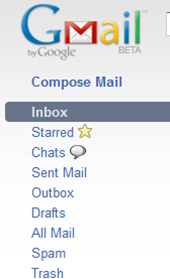
The guys at Google have been hard at work. You can tell by the stuff they post on their labs page. I was lucky enough to have come across their ‘offline Gmail’ feature, which allows for offline access to your inbox. Users will be able to read their emails in just about every way the same as they could when they are online, with the exception of the attachments of course, but that can be toggled in the settings page. Once installation has been completed, the user would notice some subtle changes to the interface of the Gmail page. Firstly, there’s an ‘outbox’ feature in the all-too-familiar left pane. In addition to being able to read your emails, you can also write emails, which are saved in your hard drive and stored in the outbox after you hit the send button. This is a cool feature for you Gmail fans out there. This is the Gmail with a twist.
Enabling Offline Gmail
Enabling Offline Gmail is easy as pie. All you need to do is navigate to the ‘Labs’ tab under Gmail settings, then look for the following section, as shown below.
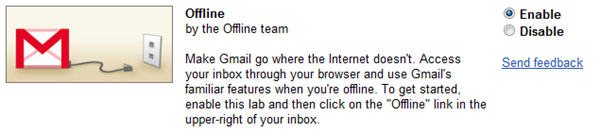
Once the feature is enabled, you may be prompted to install Google Gears. If you don’t already have Google Gears installed, you may download it here.
The installation duration depends on how much stuff you have in your inbox, so you might want to leave out the attachments.

To do that, just navigate the the ‘offline’ tab. It will only be visible once installation has been completed. For those who don’t have a fast internet connection, you may want to opt for Gmail’s ‘Flaky Connection Mode’. This connection mode differs in that Gmail will only ‘connect’ when there’s a need to synchronize with the mail server. Synchronizations are made periodically (every minute, I think) instead of every time you open a mail.
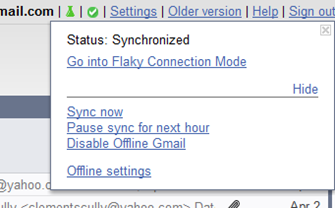
When and where there is no synchronization, the messages are loaded from the cache stored in your hard drive. The ‘Flaky Connection Mode’ is recognizable by the blue-coloured check mark at the upper-right corner of the Gmail page. You can expect a significant boost in performance by enabling this connection mode, but don’t expect images and attachments to load on the fly.

In a Nutshell…
Overall, I think Gmail’s offline capability will in no time give the competitors a run for their money. Not only has Google added a feature that many users have been longing for, but in my humble opinion, they are setting a new trend in computing.
_____________________________________________________________________________________
Pros:
- Allows for offline access, for those who don’t always have access to the internet.
- Results in faster loads.
Cons:
- Interface does not synchronize properly, and often takes a couple of minutes between switching of themes.
- Not able to load address book (contacts) while working offline.
===END===